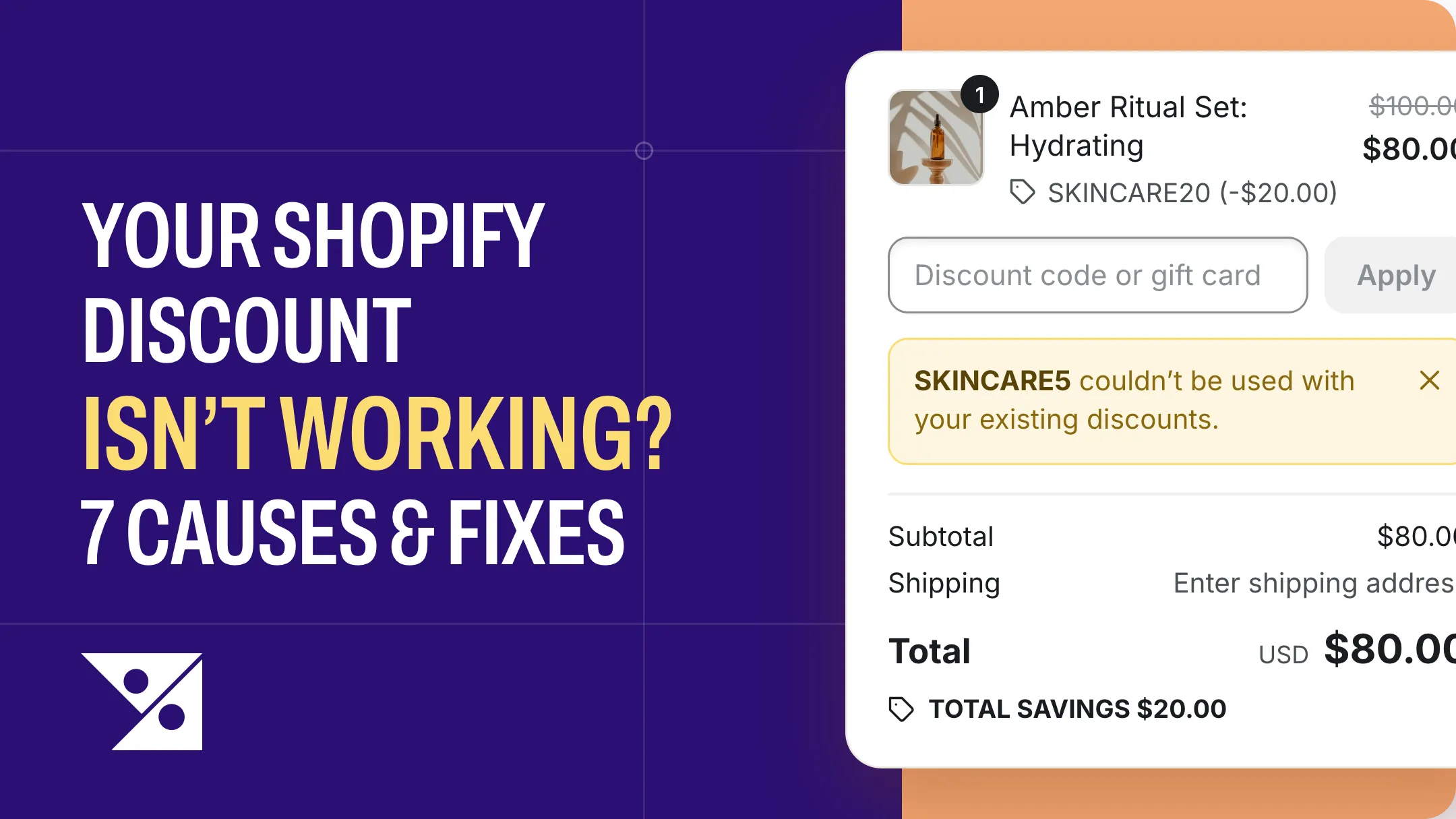
A customer just messaged you: “the discount code isn’t working.” You try it yourself and it works fine. Or you try it and see a red error you’ve never noticed before — and the promo email has already gone out.
Shopify discounts almost never fail at random. Seven settings cause nearly every “not working” report, most take under a minute to check, and they’re below in the order most likely to be yours.
The 30-second check
Match what your shopper sees to where to start:
| What the shopper sees | Start with |
|---|---|
| ”Discount couldn’t be used with your existing discounts” | Cause 1 |
| Your code is refused while your own sale is running | Cause 1 |
| ”…isn’t valid for the items in your cart” | Cause 2 |
| Only one of your two promotions shows up | Cause 3 |
| Nothing wrong — but the cart looks like it should qualify | Cause 4 |
| ”…isn’t available to you right now” | Cause 5 |
| Works for you, fails for your customer | Cause 5 |
| ”Enter a valid discount code” | Cause 6 or 7 |
Cause 1 — Why “Discount couldn’t be used with your existing discounts” appears
The symptom: you gave one customer one code, and checkout refused it — while your own sale was running.
You have “20% off everything” running automatically. You email a customer a $10-off code; they add items, the 20% applies by itself, and the code comes back rejected.
One code, from your customer’s side. Two discounts, from Shopify’s side.
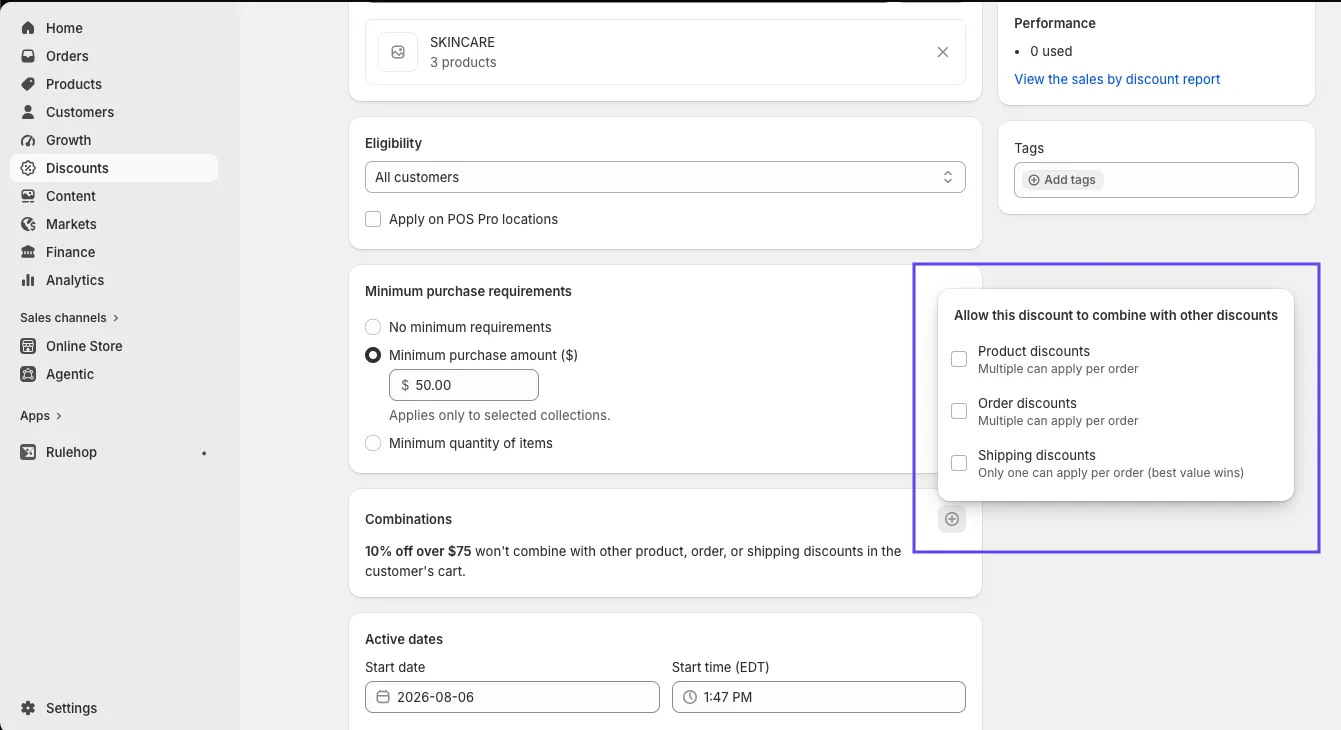
What’s happening: every discount has a Combinations section, and by default it says this:
“[Your discount] won’t combine with other product, order, or shipping discounts in the customer’s cart.”
That’s the default for every discount you make. Almost everyone scrolls past it — the only control is an unlabelled ⊕ in the corner, which doesn’t look like a setting. So a sale made in June and a code made in August are both refusing everything, and nobody decided that.
The rule is also mutual. Turning it on for one discount isn’t enough — the other has to allow yours back.
That’s why the first fix usually fails. You tick the box on the failing discount, retest, and get the same error, because the other one still hasn’t allowed yours.
The fix: open the failing discount and read its Combinations section — “won’t combine” is your answer. Click the ⊕ to allow the kinds you need, then do the same on every other active discount, especially automatic ones.
Worth knowing: combinations only work on your online store, the Storefront API and POS. On Facebook, Instagram and Google checkouts they don’t apply at all.
Cause 2 — Why “isn’t valid for the items in your cart” appears
The symptom: “[CODE] isn’t valid for the items in your cart.”
What’s happening: the cart doesn’t meet something the discount asks for — a minimum, specific products or collections, or for a Buy X get Y offer, both halves of the deal. Shopify’s own guidance is blunt about the last one: your customers have to add all eligible items to their cart themselves. Nothing gets added for them.
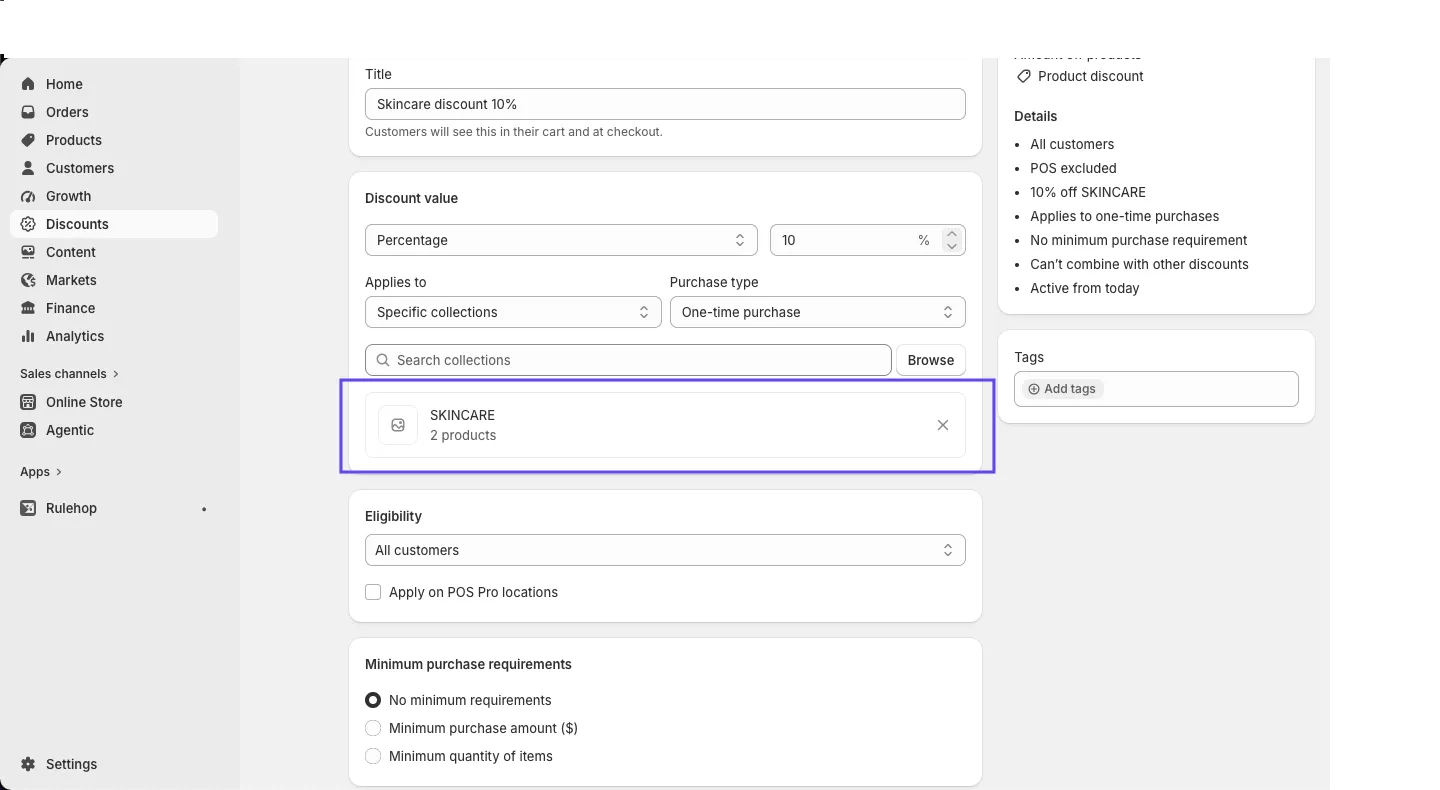
There’s a second trap hiding in Applies to. It only ever includes — specific products, or specific collections. There is no “everything except” box. So a promotion meant for “the whole store except the sale rail” ends up built as a long list of collections, and anything missing from that list quietly doesn’t qualify.
The fix: open the discount and read every requirement like a stranger would — the minimum, the exact collections listed, and for Buy X get Y, whether the reward product is actually in the cart. Then rebuild your customer’s exact cart and try it yourself.
Cause 3 — Why only one of your two promotions shows up
The symptom: no error at all. Two promotions are live, both say Active, but only one appears on any given item. Unlike Cause 1, nothing is refused — it simply doesn’t show up.
What’s happening: when two product discounts land on the same item, Shopify applies the best one for the customer — not both. Nothing is broken; the platform is choosing for you. And because there’s no error, you hear about it from a confused customer.
And it catches the people who just fixed Cause 1. Turn on “combines with product discounts” and read the line underneath: “Multiple can apply per order · One per product (best value wins).” Those are two different promises — several discounts can share an order while only one touches any given item.
This changed on 15 July 2026. Shopify now lets multiple product discounts combine on the same item — but only on Shopify Plus, and not automatically. You tag your discounts (loyalty, seasonal, clearance) and set which tags may combine, and the tags have to point both ways: if A combines with clearance, B must be tagged clearance and combine with A’s tag.
The fix: read the per-product line under “Product discounts”, not just the tick. On Plus, tag both discounts so the tags point both ways. If you’re not, only one product discount will ever land on an item — so decide which should win and keep the other off those products.
Cause 4 — Why a $104 cart misses your $100 minimum
The symptom: the cart clearly looks big enough, and the discount still doesn’t apply.
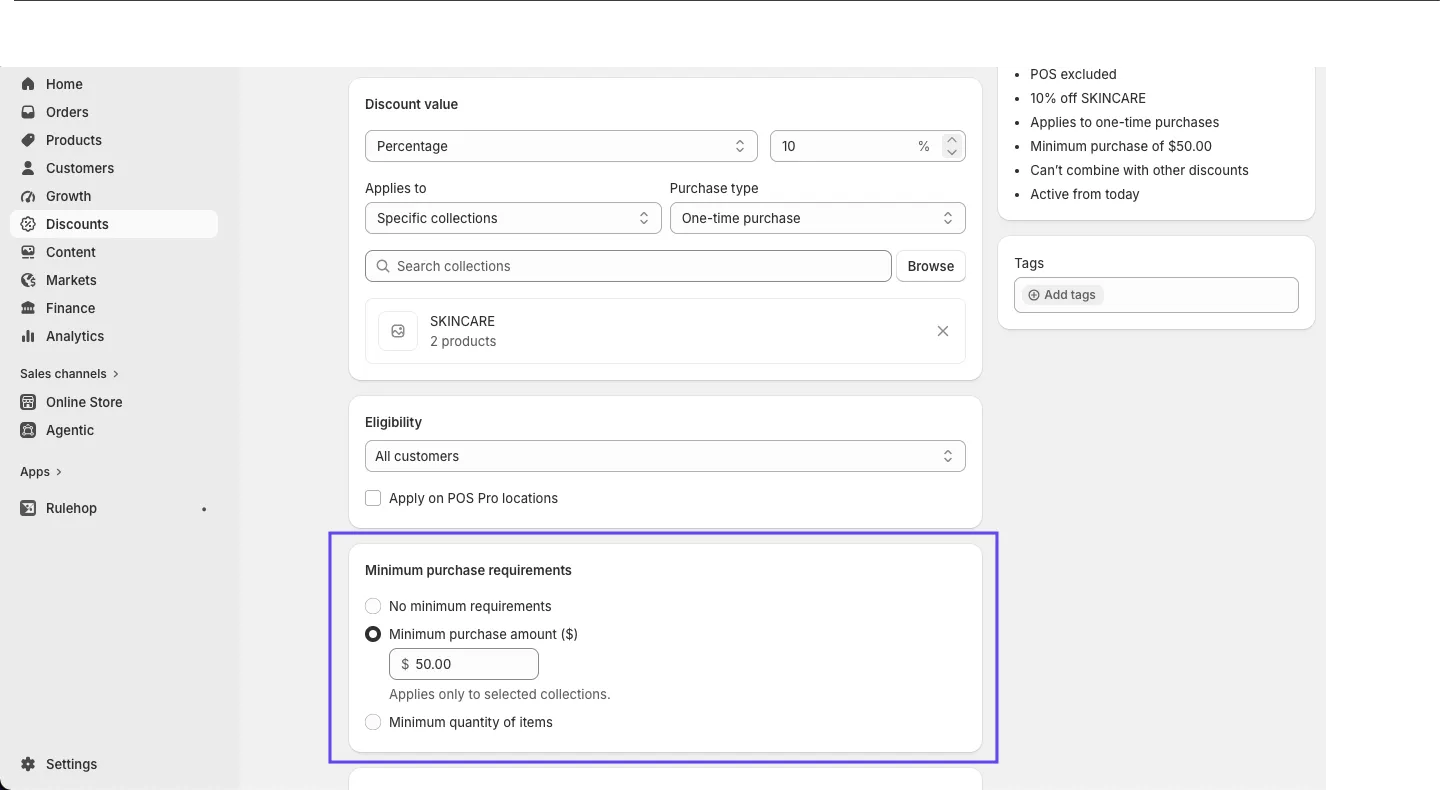
What’s happening: the minimum is measured on the products alone — before shipping, taxes and duties. A cart with $92 of goods and $12 of shipping shows $104 at checkout and counts as $92.
It narrows further if your discount applies to specific collections. The field says so in grey text underneath: “Applies only to selected collections.” So the minimum counts those items only — a shopper with $80 from your sale collection and $50 of everything else has a $130 cart and still misses a $100 minimum.
The setting has a limit of its own, too. The three choices are radio buttons — no minimum, a minimum spend, or a minimum quantity — and you get one. There’s no way to ask for “spend $100 and buy 3 items.”
The fix: measure your minimum against the qualifying items, not the order total. If your promotion needs a spend and a quantity, a native discount can’t hold both.
Cause 5 — Why it works for you but not for your customer
The symptom: “…isn’t available to you right now.” Or the reverse, which is worse: someone gets a discount they shouldn’t have.
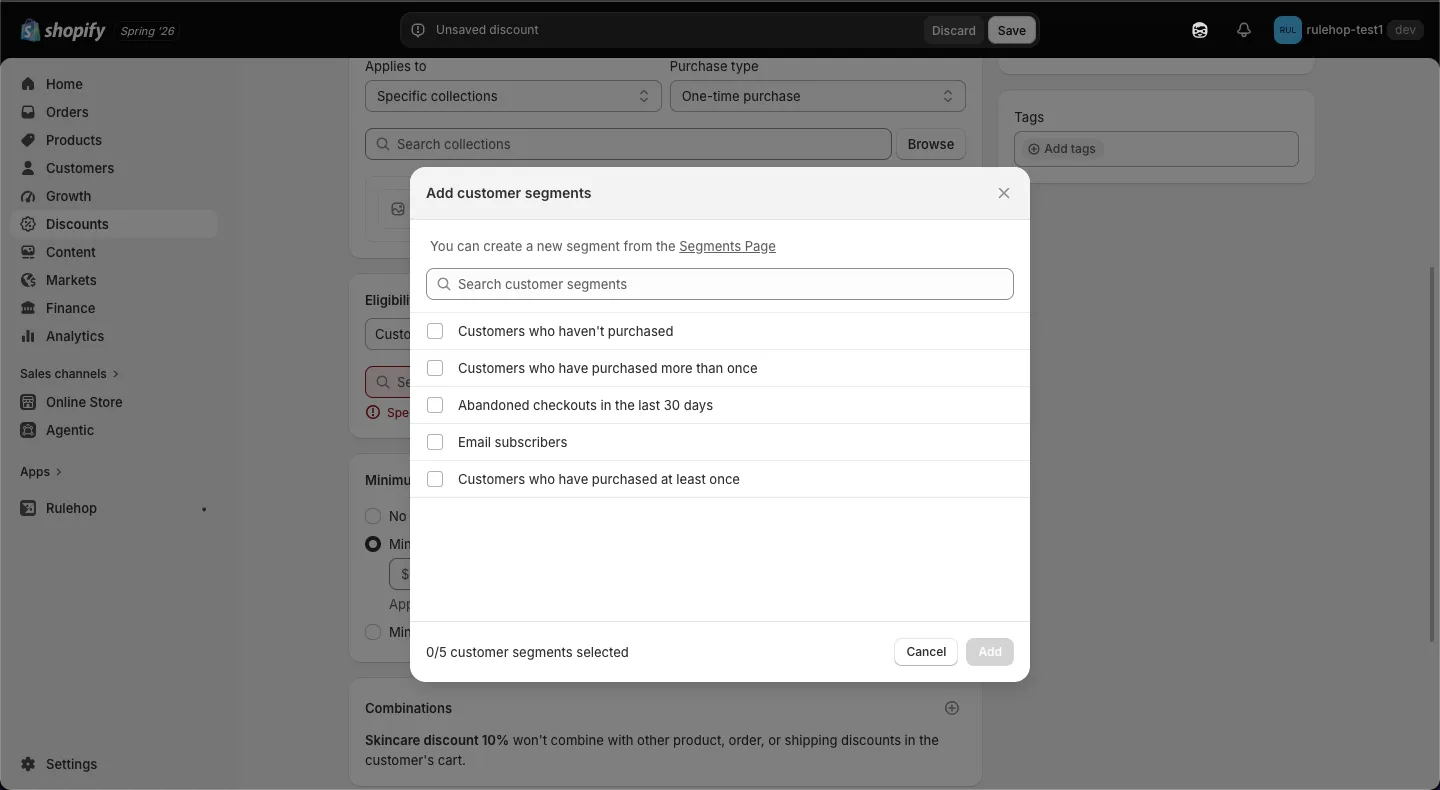
What’s happening: if the discount is limited to a customer segment, Shopify has to know who the shopper is before it can check. It identifies them by the email address or phone number they type at checkout — not by whether they signed in.
Two things follow. A genuine VIP who types a different email doesn’t qualify. And a shopper only joins a segment once they exist as a customer — which happens when they sign up, create an account, or order. Someone buying as a guest for the first time is in none of your segments, so a “new customer” offer built on one won’t reach them.
There’s also no native setting that requires a shopper to be signed in, which is why a segment-restricted code is less private than merchants assume.
The fix: open Eligibility and read which segment is selected. There’s no tag field here — “customers tagged VIP” has to be built first under Customers → Segments (pick the Customer tags filter), then chosen from this list. If you picked one of Shopify’s ready-made segments instead, read its definition: Customers who haven’t purchased sounds like new shoppers and holds only people who are already customers.
Then test both directions — as the eligible customer, and as a stranger. Tag capitalisation doesn’t matter: Approved and approved are the same tag. Two limits: five segments per automatic discount, one hundred per code.
Cause 6 — Why “Enter a valid discount code” appears on a discount you can see
The symptom: the discount is right there in your admin, and the checkout says it doesn’t exist.
What’s happening: it’s still a draft, it’s expired, or it’s scheduled to start later — and every one of those dates runs on your store’s timezone, not your shopper’s. A code that “ends Sunday midnight” ends at midnight where you are, which for some of your customers is the middle of Saturday.
The fix: confirm the status reads Active, then look at the Active dates block. The start time field names the timezone in its label — Start time (EDT) — and that’s your store’s, set under Settings → General → Store defaults. If you sell across timezones, end promotions at a stated hour and say which timezone in your marketing.
Cause 7 — Why it stopped working for your best customers
The symptom: “Enter a valid discount code” — but only for some people, and often the ones who order most.
What’s happening: “Limit to one use per customer” is switched on and they’ve used it before, possibly months ago. Or the total usage cap has quietly been reached partway through the campaign.
The fix: open the discount and check both limits — the discount’s own page shows how many times it’s been used. Raise the cap, or make a fresh discount for the rest of the run.
Before you reply: the 2-minute test
Whatever you just fixed, prove it before you answer that customer. Never test while signed in as yourself — admins and tagged accounts don’t see what shoppers see, which is exactly why “it works for me” happens.
- Open a private window. Don’t sign in.
- Build your customer’s exact cart — same products, same quantities.
- Go to checkout and apply the discount, or watch for the automatic one.
- Then remove one qualifying item and look again.
You should see: ✓ the discount line, with the amount you intended · ✕ no discount on the second cart, because it no longer qualifies.
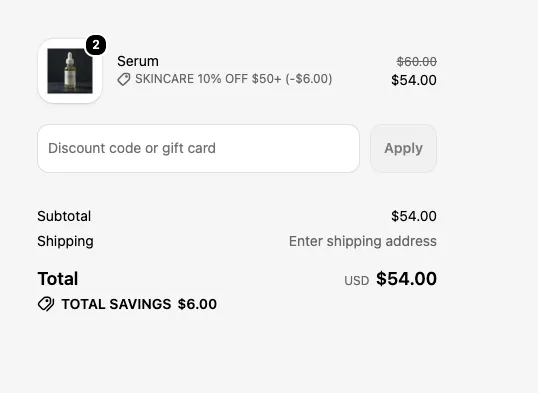
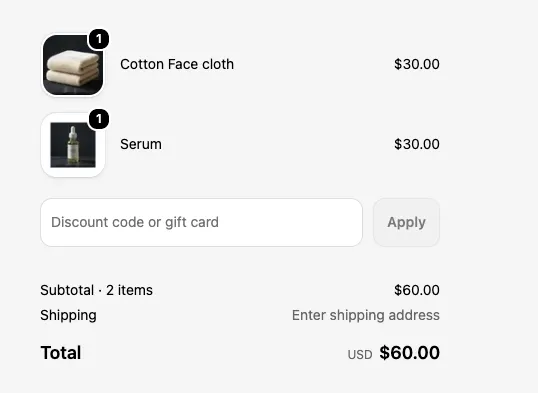
If you see anything else — a discount that survives step 4, or an amount you didn’t intend — go back to the cause you just fixed and read the setting again. A discount that fires when it shouldn’t is the expensive kind, and this is the two minutes that catches it.
When the fix isn’t a setting
Five of the seven causes above end in a box you can tick. Two of them don’t — and those two turn out to be the same problem wearing different clothes.
Causes 1 and 3 are both discounts getting in each other’s way. Two won’t combine, so one is rejected. Two land on the same item, so only the bigger one shows. Nothing is broken in either case — you’re simply running more discounts than Shopify will let cooperate. There’s a ceiling on the running, too: a store can have 25 active automatic discounts at once, app-made ones included.
Which points at a fix most merchants never try: run fewer discounts, and put more of the offer inside each one. A single discount can’t compete with itself.
Take a spend ladder — 10% off over $75, 15% over $150, 20% over $250. Shopify needs three separate discounts for that, because one discount holds one minimum (Cause 4). Three discounts means three sets of combination settings to keep in step, three chances to collide on the same items, and three of your 25 slots.
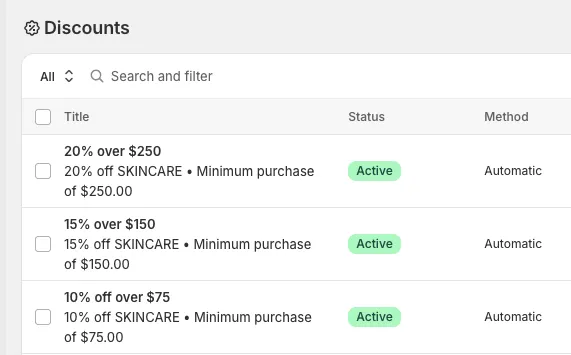
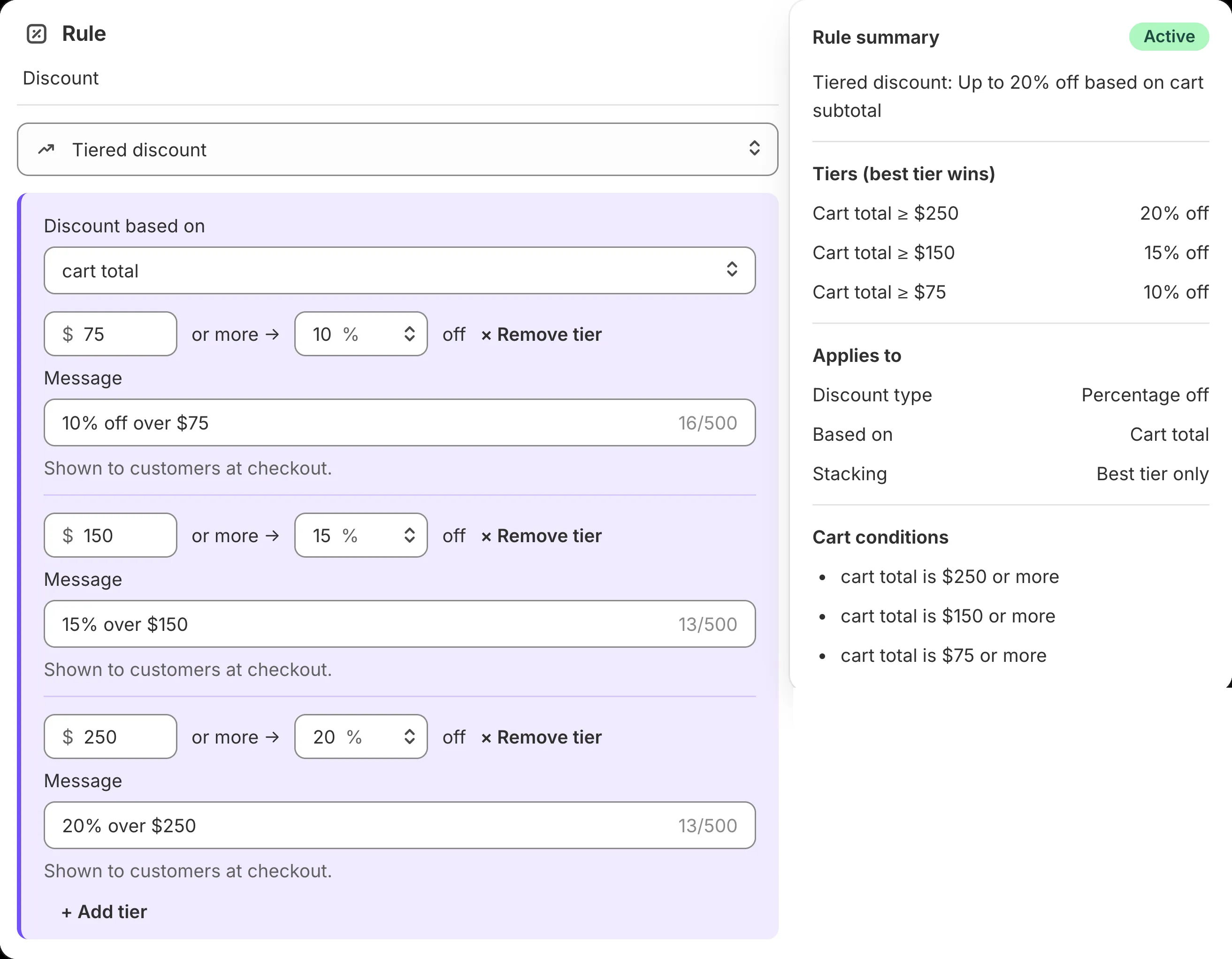
Rulehop holds the whole ladder in one discount — type “10% off orders over $75, 15% off over $150, 20% off over $250” and it builds it as a real Shopify discount, then lets you try it on a sample cart first: a $70 cart, then an $80 cart, and you see what each pays before anything goes live. Free to start.
FAQ
Why does my discount work for me but not for my customers? Almost always you’re signed in as an admin or a tagged customer and they aren’t, or their cart differs from yours by one item. Test in a private window with their exact cart — see “Before you reply” above.
My customer used the code I gave them and it was rejected. Why? Something else was already discounting that cart — usually your own automatic sale. Two discounts only sit together when each one’s Combinations settings allow the other’s kind, and those boxes start unticked. (Shoppers can use up to five product or order codes plus one shipping code on an order, so the limit isn’t the number of codes — it’s whether every pair agrees.)
Why doesn’t the discount show in the cart, only at checkout? Usually that’s normal. Codes are entered at checkout, and many carts don’t preview automatic discounts. If the checkout total is right, the discount is working.
My customer says there’s no place to type the code at all. If the promotion is an automatic discount there is no code — check whether your marketing said “use code” for something that applies by itself. If it is a code discount, a checkout customisation or app may be hiding the field.
All my discounts stopped working at the end of June. What happened? If your store ran Shopify Scripts, they stopped executing on 30 June 2026 and nothing replaced them automatically — no error, no warning, just full-price checkouts. Here’s how to find what you lost and rebuild it.
Does deleting and recreating the discount help? Rarely — the same setting fails the same way, and you lose the usage history. Walk causes 1–7 first.